


What is Reposting on Instagram?
Reposting on Instagram refers to the act of sharing someone else’s content on your own profile. This practice allows users to highlight content that resonates with them, promotes community engagement, and helps in expanding their reach. what is reposting on instagram is frequently a topic of discussion, especially among marketers and influencers who are keen on maximizing their content strategies.
Why Repost on Instagram?
Reposting serves several purposes, making it an essential feature for many users on Instagram:
- Community Building: Sharing others’ content helps in building a sense of community. It shows appreciation for fellow creators and can lead to collaborative opportunities.
- Content Variety: Reposting can diversify your feed, presenting your followers with a variety of content that they may find interesting or useful.
- Engagement Increase: Engaging with other users’ content often leads to reciprocal actions, meaning that when you repost someone, they might do the same for you.
- Content Strategy: For brands and marketers, reposting can be an effective way to fill gaps in your content calendar without always having to create new material.
How to Repost on Instagram
While Instagram does not have a built-in repost feature, there are various methods to share someone else’s post on your profile:

1. Using Third-Party Apps
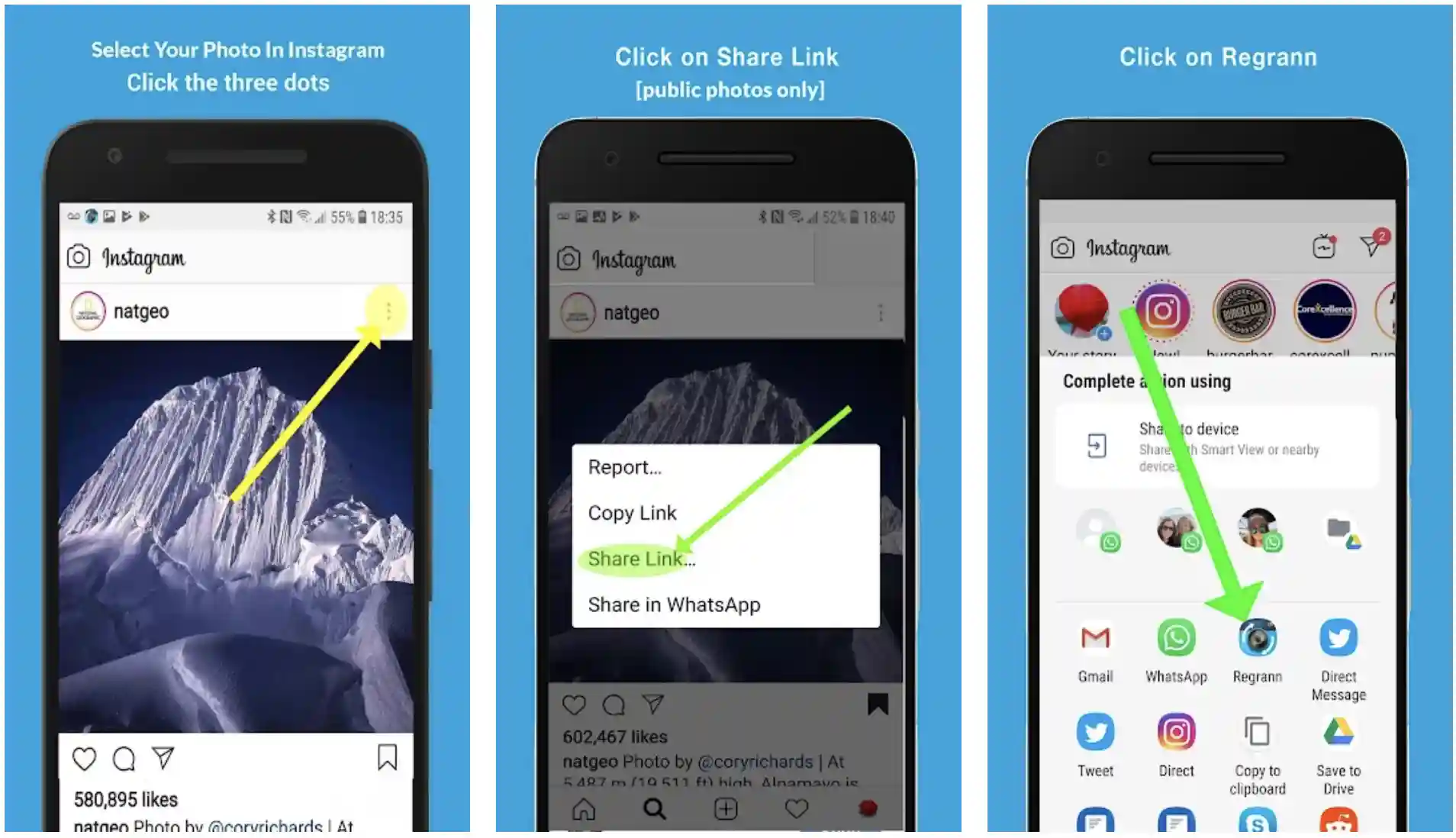
Several apps, such as Repost for Instagram, allow users to easily share posts. Here’s how:
- Download a reposting app from your app store.
- Find the post you want to share and tap on the three dots (⋮) in the upper right corner of the post.
- Select “Copy Link” to copy the URL of the post.
- Open the reposting app, which will recognize the copied link and give you the option to repost with the original caption and credit.
2. Manual Reposting
If you prefer not to use third-party applications, you can always take a screenshot of the post:
- Take a screenshot of the post you wish to share.
- Edit the image if necessary while ensuring the original creator’s username is visible.
- Upload the screenshot to your Instagram feed and give credit to the original creator by tagging them in the caption.
3. Sharing Stories
Another popular way to repost on Instagram is through Stories. Here’s how:

- Find the post you want to share.
- Tap the airplane icon below the post to open the share options.
- Select “Add post to your story.” This will allow you to share the post directly to your stories, along with an automatic tag to the original poster.
Best Practices for Reposting
To maintain ethical standards and maximize the effectiveness of reposting, consider the following best practices:
- Always Give Credit: Acknowledge the original creator by tagging them in your post or story. This not only respects their work but can also encourage followers to check out their profile.
- Choose Quality Content: Only repost high-quality posts that align with your brand’s image and values, ensuring that your feed remains cohesive and visually appealing.
- Avoid Overposting: While reposting can be useful, make sure not to overwhelm your followers with too many reposts in succession. Balance original content with reposts.
- Engage with the Community: When you repost, interact with original posters and their followers. Commenting on their original post and thanking them for allowing you to share helps build connections.
Conclusion
Reposting on Instagram can be an advantageous practice if done correctly. It fosters community engagement, enriches your profile with diverse content, and can ultimately increase your visibility on the platform. Whether you choose to use third-party apps or the manual methods, always remember the importance of giving credit and maintaining quality. By following best practices, you can seamlessly integrate reposting into your Instagram strategy for greater effectiveness and connection within the vibrant community.
